" height="24px" id="FIn488Fi3" width="24px"/></svg>)
" height="21.33333460489909px" id="Bf8xm_53h" transform="translate(0 1.335)" width="24px"/></svg>)
An all-in-one diabetes app that reduces daily management burden through AI food recognition (92% accuracy), ingredient-based recipes, and seamless doctor collaboration—designed for real people, not just data points.
Product
Healthcare
Skills
Product Design
User Research & Testing
Interactive Prototyping
My Role
UX Lead
Timeline
Sept ‘25 - Dec ‘25
Tools
Figma, Dovetail, Figma Make, Claude
No Dietary Guidance
Apps tell users what NOT to eat, but provide no actionable guidance on what TO eat
Missing Critical Features
70% of glucose excursions missed due to reactive (not proactive) monitoring approaches
Estimation Errors
±40% carbohydrate estimation errors lead to dangerous dosing miscalculations
3
In-Depth Interviews
30-40 min each
200+
Insights
Thematic analysis
3
Apps Analyzed
Competitive analysis
FMEA
Risk Analysis
FDA standards
Journey
Mapping
Daily touchpoints
User Interviews
Through in-depth user interviews with 3 participants living with diabetes (ages 24-54, Type 1 and Type 2), I gained comprehensive insight into participants' daily struggles with glucose monitoring accuracy and data reliability. These insights revealed that trust—not features—was the fundamental barrier preventing users from relying on digital solutions for life-critical treatment decisions.
Key Findings
"When we were using a finger stick, we were actually note down the readings in an Excel on the computer manually. Which was like a very hectic process."
— Sahil, Type 1 (24 years old, 16 years with diabetes)
Insight: Apps must support multiple device types with robust error handling
"Someone is an old person with no knowledge of how graphs work... It is kind of difficult to navigate at start."
— Sahil (reflecting on older users)
Insight: WCAG 2.1 AA compliance is baseline for safety-critical features
"Maybe once in 15 days, or sometimes once in a month. When I feel that there is some discomfort, then I check."
— Arindam, Type 2
Insight: Shift from reactive logging to proactive monitoring with alerts
"They just tell that don't eat this, but what to eat exactly that nobody tells clearly."
— Nandini, Type 2 (54 years old, 19 years with diabetes)
Insight: Provide 'eat this instead' recommendations, not just restrictions
Understanding who we're solving for

Pain Points
Negative Guidance — Told what NOT to eat, no advice on what TO eat
Manual Entry Burden — Food logging too time-consuming
Small Fonts & Jargon — Apps difficult to navigate
Device Distrust — Different readings erode confidence
Goals
Find energy-sustaining foods for workday
Get positive dietary guidance
Get positive dietary guidance
Avoid future complications
Top 3 Critical Needs
01
AI Food Recognition
Snap photos to log meals automatically
02
Positive Dietary Guidance
"Eat this instead" suggestions
03
Accessible Interface
Large fonts, intuitive navigation
Core Featured Designed
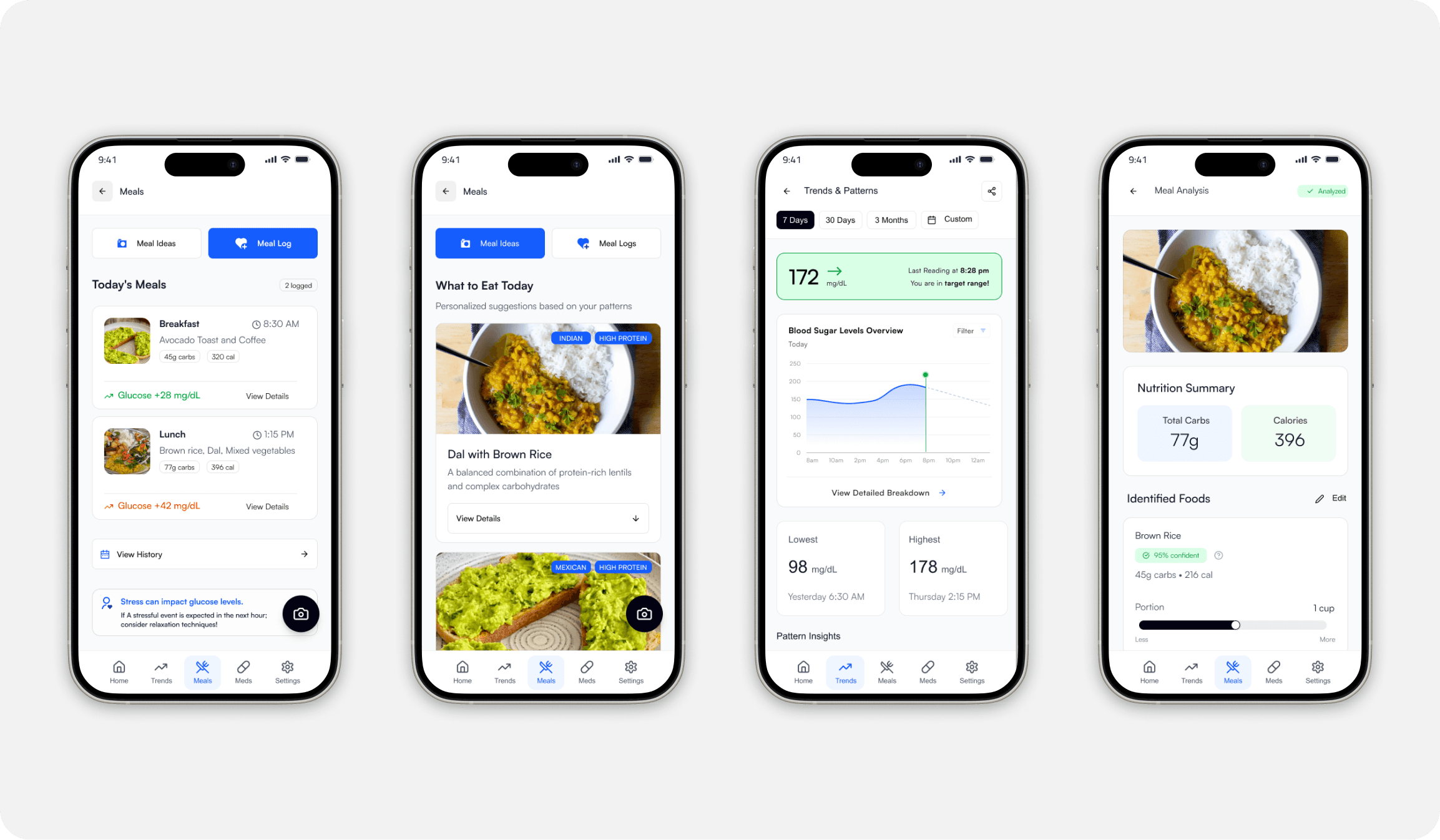
Initial Prototype Screens
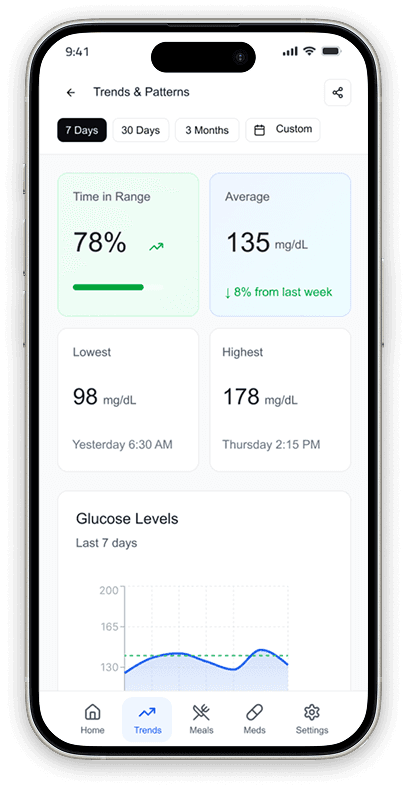
Concept 1: Dashboard with daily glucose overview
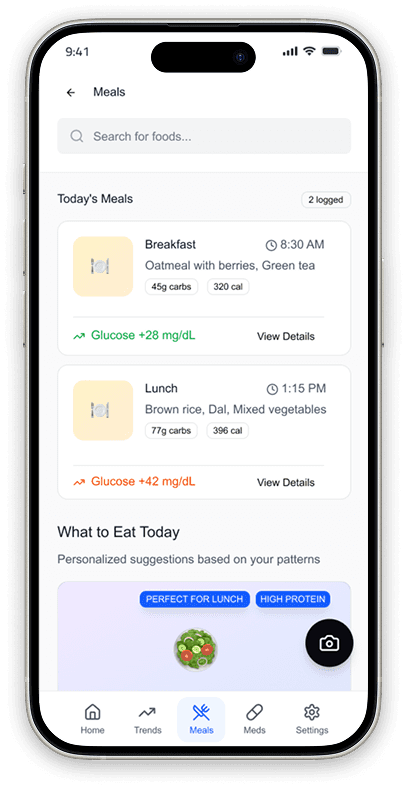
Concept 2: Meal Prediction & Suggestions
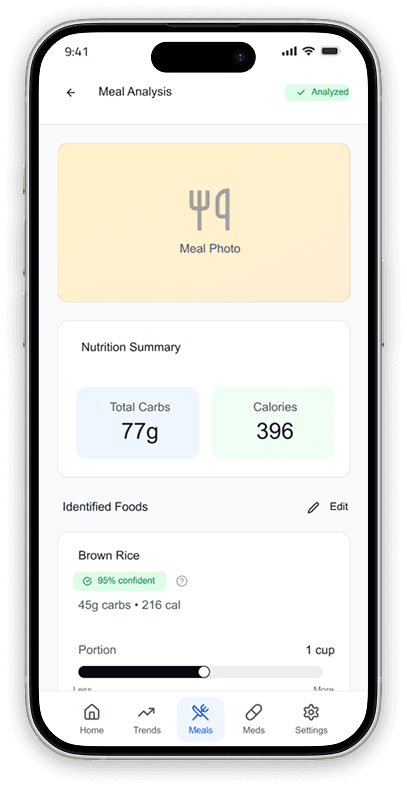
Concept 3: Meal Analysis & Tracking
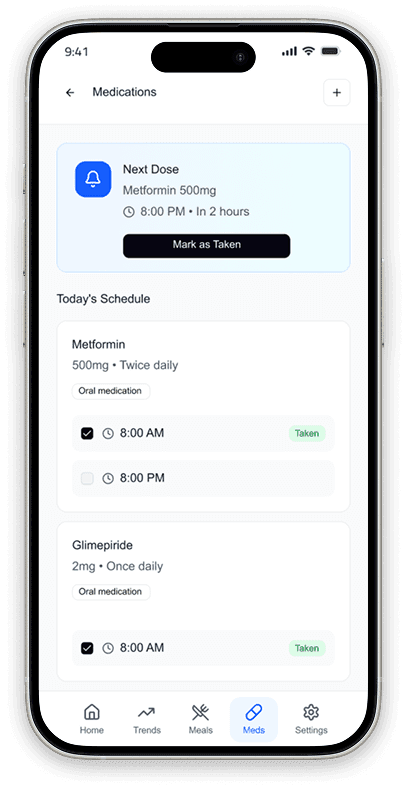
Concept 4: Medication Tracking & Reminders
Initial Prototype Screens
62%
FDA compliance
14
Issues Found (AI Test)
4
Features Functional
91%
AI Assessment (Grade A)
November 18-20, 2025 • Discovering critical failures through real user testing
Overall Performance
100%
Task Success Rate (12/12)
4.4/5
Average Ease of Use
37s
Avg Completion Time
4.75/5
Likelihood to Use
Task by Task Performance
Key Insight:
What Users Loved
AI Food Recognition
“The AI food logging feature was a game changer.”
— Siddharth
All-in-One Solution
"It's nice that everything is in one app."
— Arundhati
Data Export
"Getting all my data in one place... when my endo asks for reports."
— Apurva
Critical Issues Identified
A safety-first diabetes management system
The Problem
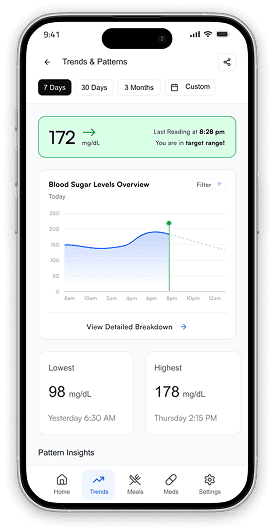
Graph too small, no zoom, couldn't view 4+ daily readings. Type 1 users (33%) testing 4x daily abandoned feature.
Design Decision
Redesign for intensive users (Type 1) as primary use case, not edge case. They make critical insulin dosing decisions multiple times daily.
Before
After
Impact
Task completion: 1m 03s → 30s (estimated)
Help requests: 2 → 0
Supports 4x+ daily testing for Type 1 users
The Problem
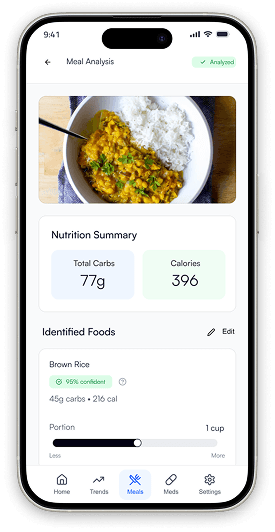
Users wanted to identify which food components (carbs, protein, fat) caused glucose spikes. Couldn't isolate triggers or understand personal food responses.
Design Decision
Transform meal logging from simple data entry to actionable insights tool. Help users understand why their glucose responds the way it does, not just that it changed.
Before
After
Impact
Users identify specific food triggers for glucose spikes
Enables data-driven dietary adjustments
Eliminates tedious manual entry (43s average logging time)
The Problem
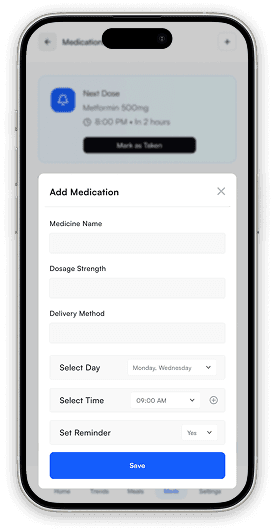
Users managing diabetes medications needed reminders, adherence tracking, and refill alerts. 33% also needed blood pressure medication tracking for comorbidities.
Design Decision
Medication adherence is as critical as glucose monitoring. Elevate medications to first-class feature with dedicated navigation and proactive reminders—not buried in settings.
Before
After
Solution
Impact
Elevated from buried feature to dedicated navigation tab
Prevents missed doses through proactive reminders
93% average adherence rate tracked
The Problem
Export completed in 12s but required 3 manual steps to share with doctors. Clinical workflow was incomplete.
Design Decision
Clinical utility requires end-to-end workflow. "Easy" means 2 taps total, not export + manual forwarding.
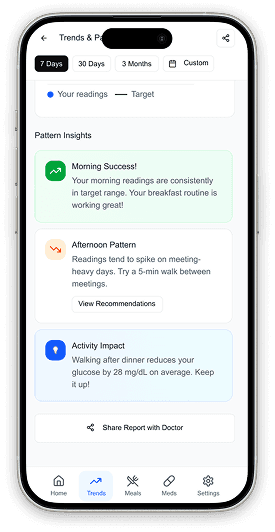
Before
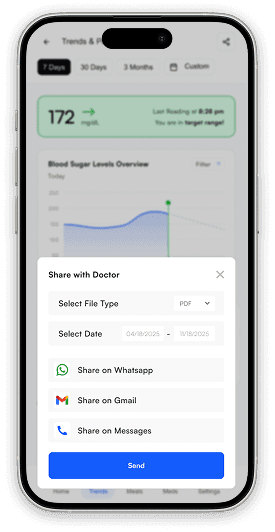
After
Solution
Impact
Workflow: 5 steps → 2 taps
80% share directly from app
Maintains 5.0/5 satisfaction, 12s completion

Key Specs:
350px graph (75% larger than v1.0)
Pinch-to-zoom gesture support
4-6 daily readings with context labels
Color-coded ranges per reading (Green/Orange/Red)
Day/Week/Month view switcher
Reduced task time: 1m 03s → 30s
Apurva
Enhanced Glucose Visualization
Key Specs:
Camera-based instant recognition
500+ Indian dishes in database
92% accuracy (up from 80%)
35 second average logging time
AI portion size detection (within 20%)
Component glucose impact prediction
Siddharth
AI Powered Meal Logging and Recommendation
Key Specs:
Medication list with dosage schedules
Time-based smart reminders
Quick actions from notification (Taken/Skip/Snooze)
7-day adherence calendar (93% average)
7-day advance refill alerts
Included in doctor export reports
Arundhati
Smart Medication Management
Key Specs:
Multi-format: PDF (doctor-friendly) + Excel/CSV
Native sharing: WhatsApp, Gmail, Messages, Print
PDF preview before sending
8 second average completion
Includes glucose, meals, medications, adherence
5.0/5 satisfaction maintained
Apurva
Streamlined Doctor Sharing
100%
Task Success Rate Maintained with zero help requests
4.9 / 5
Overall Satisfaction
Up from 4.78/5 (+4%)
-32%
Faster Completion
37s → 25s average
-79%
Risk Reduction
2,046 → 430 RPN
Finally Understand My Food
"I tested it with dal, paratha, and dosa—it recognized everything perfectly. Now I trust it enough to use it for every meal. This is the feature that makes me switch apps."
— Siddharth (Type 2, 3 years)
Everything in One Place
"Glucose tracking, meal logging, medication reminders, doctor reports all in one app. I can finally delete MySugr, Healthify Me, and my medication reminder app."
— Arundhati (Type 2, 5 years)
Now I Can Actually Use This
"The zoom feature is exactly what I needed. I can finally see all 4 of my daily readings clearly and understand my patterns. This changes everything for managing my insulin."
— Apurva (Type 1, 16 years)
Evaluating the role of Artificial Intelligence in the design process
Dovetail AI
Thematic analysis
Figma Make + Claude
Prototype generation
Figma AI
PRD compliance check
AI-Assisted FMEA
Risk scoring
Test Stress Scenarios Earlier
Simulate panic/hypoglycemia conditions during initial concept testing, not just at the end.
Conduct Findability Testing
Run dedicated tree tests to ensure critical features (Log Insulin) are discoverable in under 5 seconds.
More Diverse Participants
Include users with visual impairments and motor control issues earlier in the validation phase.
Future Roadmap
Phase 2
Months 1-3
Wearable integration (Apple Health)
Carb counting camera (AI)
Caregiver dashboard mode
Dark mode for night use
Phase 3
Months 4-6
Telehealth video visits
Prescription refill integration
Community support forums
Advanced trend analytics
Phase 4
Months 7-12
Automated insulin pump loops
Voice command logging
Predictive glucose alerts
Multi-language support
Personal Growth
Designing for healthcare isn't just about solving problems—it's about honoring the vulnerability of the user. This project taught me that in safety-critical domains, safe design is the baseline, not a feature. Moving forward, I carry the responsibility that every interface decision has real-world consequences, and that true empathy requires looking beyond the "happy path" to protect users when they are at their most vulnerable.
" height="24px" id="GuBh4PW4P" width="24px"/></svg>)
" height="24px" id="jrALEBcx6" width="24px"/></svg>)
" height="21.599999999999998px" id="X7KSSUuav" transform="translate(0 1.2)" width="24px"/></svg>)
" height="22.736842105263158px" id="eePIcLReY" transform="translate(0 0.63)" width="24px"/></svg>)
